MySQL JDBC Driver Download
Download the MySql JDBC driver, copy the JDBC URL into DbSchema, and start designing schemas with ER diagrams — free Community Edition.
About the MySql JDBC driver
A JDBC driver is a Java .jar library that lets applications connect to MySql.
DbSchema uses JDBC to reverse engineer schemas, run SQL, and generate documentation.
Driver files are usually published by the database vendor or an open-source project.
JDBC URL format
Host, port, database name, and SSL options are passed in a URL starting with jdbc:.
Each MySql driver uses its own syntax — see the connection details below.
The MySql JDBC driver
MySQL is the world's most widely deployed open-source relational database, powering everything from WordPress blogs to large-scale e-commerce platforms. It runs on every major OS and is the go-to choice for LAMP and LEMP stack web applications.
The MySQL JDBC URL
- Required File(s): mysql-connector-java-nn-bin.jar
- Java Driver Class: com.mysql.jdbc.Driver
- JDBC URL: jdbc:mysql://HOST[:PORT][/DB]
- Website: MySQL
Download the MySql JDBC Driver
Last updated August 2025 - verified for MySQL 8.4 / Java 21 compatibility.
The driver library files are compressed in a zip archive. Extract it and load the jar file using DbSchema's Driver Manager.
If you cannot connect, or you get issues with the driver, please ask DbSchema Team for help.
Solving Common MySQL Connectivity Issues
Enable Remote Access on MySql Server
By default MySql does not allow connecting from another machine as the one where the server is installed. You can enable remote access during installation ( see the next chapter ) or later using the instructions below.- On the server type in the command prompt or terminal mysql -u root -p <root_password> The mysql console should start.
- List the databases using show databases
- View the configured grants using select * from db;
- Enable remote access for a user foo using GRANT ALL ON foo.* TO bar@'202.54.10.20' IDENTIFIED BY 'PASSWORD'; Here you have to edit the user ( put your user instead of foo ), the IP of the client machine and the root password.
MySql Installation Tips
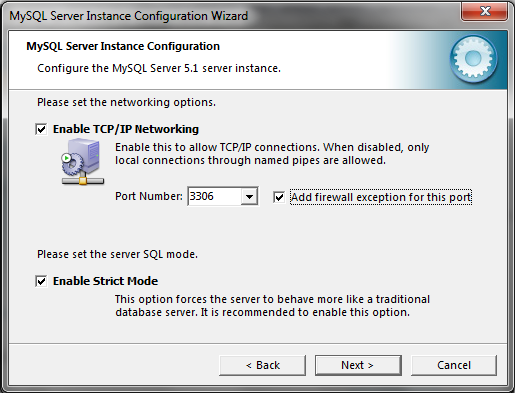 Install MySql from http://www.mysql.com. During installation go for a detailed install,
and when you are prompted for the user password check the 'Enable root access from remote machines'.
Install MySql from http://www.mysql.com. During installation go for a detailed install,
and when you are prompted for the user password check the 'Enable root access from remote machines'.
Enabling this you will be allowed to connect to MySql from another computer. Remember the password you set here, it will be requested when connecting to the database as user root.
DbSchema and MySQL
DbSchema's ER diagram tool is especially useful for MySQL's InnoDB schemas, where foreign key relationships between tables define the data model. Use the Schema Synchronization feature to safely roll out ALTER TABLE statements across dev, staging, and production without breaking foreign key constraints.
Test the driver with DbSchema
Connect MySql, build your first ER diagram in minutes. No account required.
Download driver & DbSchema
Get the MySql driver zip below and install DbSchema for Windows, macOS, or Linux.
Register the .jar
In DbSchema, open Driver Manager, add the extracted JAR, and paste your JDBC URL.
Design & document
Reverse engineer MySql, edit the model visually, and publish schema documentation.
Use MySql visually in DbSchema
After the JDBC driver connects, you get ER diagrams, SQL editor, schema sync, and HTML documentation in one desktop app. Compare DbSchema editions.
ER diagrams
Reverse engineer MySql into an interactive diagram and edit structures visually.
SQL & query builder
Run SQL with autocomplete or compose queries without writing every join by hand.
Schema documentation
Export HTML docs your team can browse without installing DbSchema.
Full MySql guide
Connection tips, ports, SSL, and schema design workflows on the database landing page.
Setup guides
JDBC driver FAQ
Related JDBC drivers
Other drivers teams often configure alongside MySql.
 MariaDb JDBC
 Aurora MySql JDBC
 PlanetScale JDBC
 TiDB JDBC
 SingleStore JDBC
 MemSQL JDBC
Related databases
Teams working with MySql often use these engines too. Explore dedicated guides and JDBC setup for each.