Download AzureSQL JDBC Driver
Download the AzureSQL JDBC driver, copy the JDBC URL into DbSchema, and start designing schemas with ER diagrams — free Community Edition.
About the AzureSQL JDBC driver
A JDBC driver is a Java .jar library that lets applications connect to AzureSQL.
DbSchema uses JDBC to reverse engineer schemas, run SQL, and generate documentation.
Driver files are usually published by the database vendor or an open-source project.
JDBC URL format
Host, port, database name, and SSL options are passed in a URL starting with jdbc:.
Each AzureSQL driver uses its own syntax — see the connection details below.
The AzureSQL JDBC driver
Azure SQL Database is Microsoft's fully managed relational database service in the cloud, based on SQL Server. It offers built-in high availability, automatic backups, elastic scaling, and deep integration with Azure services — ideal for cloud-native applications.
DbSchema can connect to Azure Cloud database! Just connect using host 'servername.database.windows.net', port 1433 and configured user and password.
The Azure SQL JDBC URL
- Required File(s): sqljdbc.jar
- Java Driver Class: com.microsoft.jdbc.sqlserver.SQLServerDriver
- JDBC URL: get it from Azure page
- Website: Microsoft Azure
To get the connection string https://azure.microsoft.com/en-us/account/, create a database and press 'connection strings' :
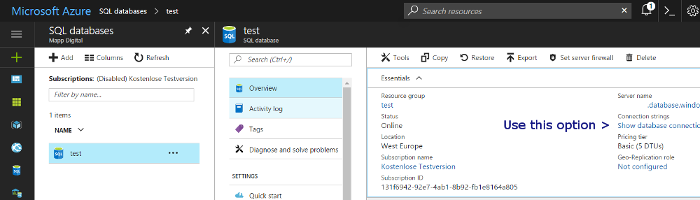
If you forgot the password you can reset it directly in the interface:

The driver archive is a zip file. Extract it and load the .jar files using DbSchema's Driver Manager.
DbSchema and Azure SQL
DbSchema connects to Azure SQL Database using the SQL Server JDBC driver, with the host in the form servername.database.windows.net. Use DbSchema's ER diagrams to visualize Azure SQL schemas and the Schema Sync feature to push local schema changes to the cloud.
Test the driver with DbSchema
Connect AzureSQL, build your first ER diagram in minutes. No account required.
Download driver & DbSchema
Get the AzureSQL driver zip below and install DbSchema for Windows, macOS, or Linux.
Register the .jar
In DbSchema, open Driver Manager, add the extracted JAR, and paste your JDBC URL.
Design & document
Reverse engineer AzureSQL, edit the model visually, and publish schema documentation.
Use AzureSQL visually in DbSchema
After the JDBC driver connects, you get ER diagrams, SQL editor, schema sync, and HTML documentation in one desktop app. Compare DbSchema editions.
ER diagrams
Reverse engineer AzureSQL into an interactive diagram and edit structures visually.
SQL & query builder
Run SQL with autocomplete or compose queries without writing every join by hand.
Schema documentation
Export HTML docs your team can browse without installing DbSchema.
Full AzureSQL guide
Connection tips, ports, SSL, and schema design workflows on the database landing page.
Related JDBC drivers
Other drivers teams often configure alongside AzureSQL.
 Access JDBC
 Aurora MySql JDBC
 Aurora PostgreSQL JDBC
 Cache JDBC
 Cockroach JDBC
 CTreeAce JDBC
Related databases
Teams working with AzureSQL often use these engines too. Explore dedicated guides and JDBC setup for each.