DbSchema vs Navicat: Full Feature Comparison for Teams in 2026
For the person choosing which product a team will design, document and version its database schemas with.
On this page
Your schema lives in two places: a diagram somebody drew once, and the database itself. DbSchema is the choice when keeping those two in step is the job. It holds the design in a model file, compares that file against the live database, and generates the migration script from the difference. Navicat Premium is an administration suite built around the live connection, and it schedules the data work that runs beside the design.
This comparison covers DbSchema 10.5.2 and Navicat Premium 17.3.11[1], read on both vendors' current pages on 5 September 2026.
Which tool does each job
Both products run on Windows, macOS and Linux, and both connect to a long list of engines. They differ in what sits at the centre of the workflow. DbSchema puts a model file there and treats the database as a deployment target, which is what separates a database design tool from an administration suite. Navicat Premium puts a live connection there and keeps its models in workspaces beside it.
Read the row that matches the job you are buying for. The DbSchema column names the edition that carries the feature, taken from the editions page; the Navicat column names the edition from the Navicat Premium feature matrix[2].
| Job | DbSchema | Navicat Premium |
|---|---|---|
| Visual ER modelling | Edit the diagram itself, Community | ER diagram view, Enterprise |
| Offline design | Portable model file, Pro | Model workspaces, Enterprise |
| Model against live database | Compare and generate DDL, Pro | Model to database and back, Enterprise |
| Server against server | Not offered | Structure synchronization, Enterprise |
| Git on the design | Stage, commit, push, pull, Pro | Not listed |
| NoSQL engines | MongoDB, Cassandra, Redis, Elasticsearch, DynamoDB | MongoDB, Redis |
| Documentation | Interactive HTML5, PDF, Markdown, Pro | Data dictionary, diagram to PDF, Enterprise |
| Automation | Groovy scripts, run from the command line or a CI pipeline | Scheduled backup and data transfer, Enterprise |
If your week is spent drawing tables that do not exist yet, documenting the ones that do, and getting a reviewed change onto a server, DbSchema is built around exactly that sequence.
Visual ER diagrams
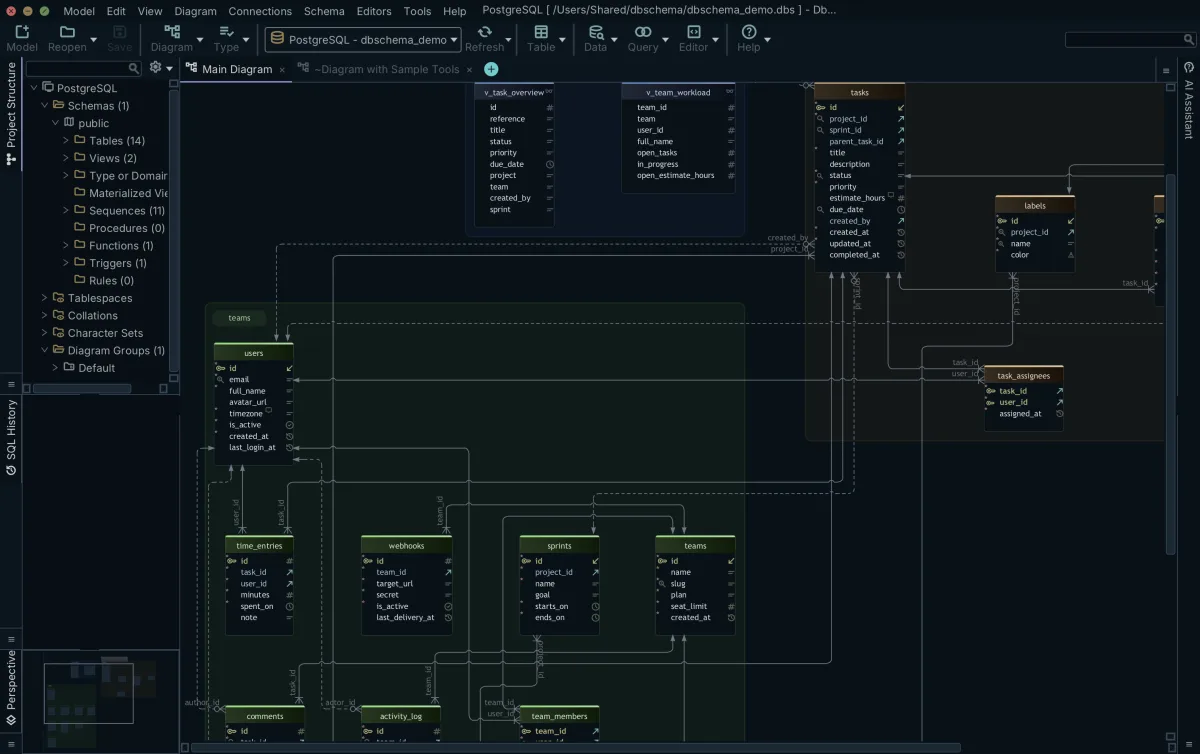
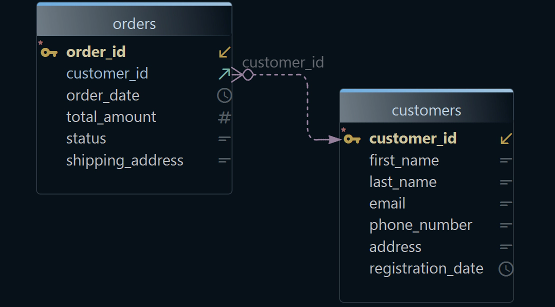
In DbSchema the diagram is the design surface rather than a picture of one. Create tables, columns, indexes and foreign keys on the canvas by clicking and dragging, and the model changes as you draw. A single DbSchema project holds many diagrams, each with its own layout and its own set of visible tables, so a wide schema stays readable when you cut it into an orders view and a reporting view. Group tables, colour them, annotate them, and export a diagram as an image, as PDF or as interactive HTML5.
Every one of those edits changes the model file. The database keeps the shape it had until you run the generated SQL against it, which is the point of the split and the reason a design review can happen before production sees anything.
Navicat Premium 17.3.11 ships an ER diagram view and a model designer covering conceptual, logical and physical layers, with auto layout and drawing objects, in the Enterprise edition[2]. Navicat Premium Lite, the free edition[3], has neither. Editing a live database object through the Navicat diagram is narrower than editing it in DbSchema, where the diagram and the model are one file, and that breadth is why DbSchema turns up on best ER diagram tools shortlists and holds up on large schemas.
Offline schema design
Offline design is the clearest structural difference between the two. DbSchema saves the schema to a local model file, so you can design tables, relationships and constraints with no database in reach and deploy the result when the change is ready. Switch to disconnected mode from the connection menu in the toolbar, keep editing, and DbSchema accumulates the differences until you reconnect and apply them selectively. Saving the model to a file is a Pro feature; Community connects, reverse-engineers and draws interactive diagrams.
Navicat Premium 17.3.11 Enterprise also models offline, which older comparisons get wrong. Its model workspaces hold conceptual, logical and physical models[2] and export to a SQL file, and Navicat Premium Lite has no model workspaces. Outside those workspaces the application works against a live connection.
Designing offline and synchronizing later is the DbSchema workflow the rest of this page keeps returning to: the design phase and the deployment step are separate, and the review sits between them.
Git integration and team collaboration
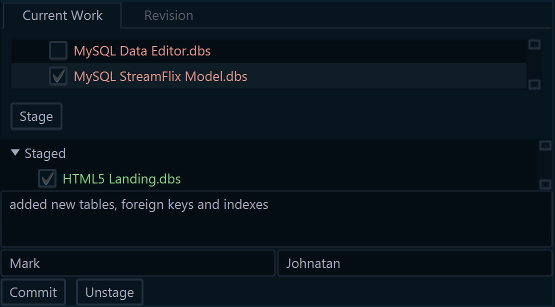
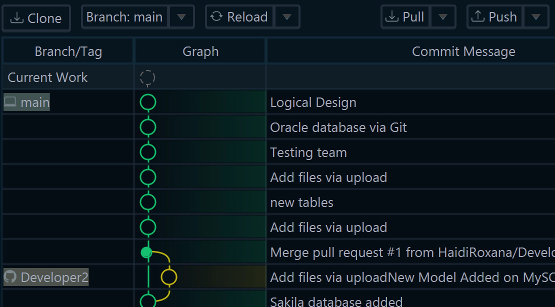
Git is the widest gap in this comparison. Open the Git dialog from the Model menu and DbSchema clones a repository, stages the model file, commits it, pushes it, and pulls what your colleagues wrote. Compare with Current opens the Synchronization Dialog on the version that arrived, so you read a teammate's schema change as differences between objects rather than as a wall of DDL.
Because the DbSchema model is one file, it drops into the repository next to the application code. Branch it, review a schema change in a pull request, merge it: the same path the application code takes, which is what team collaboration in schema design rests on. Committing and pushing changes the repository and nothing else; the database changes only when you synchronize.
The Navicat Premium 17.3.11 feature matrix lists no version control[2]. What it lists is Navicat Collaboration: connection settings, queries, snippets, virtual groups and, in Enterprise, BI and model workspaces synchronized through Navicat Cloud or Navicat On-Prem Server. DbSchema sits on the short list of database design tools with Git built in rather than bolted on.
Schema synchronization
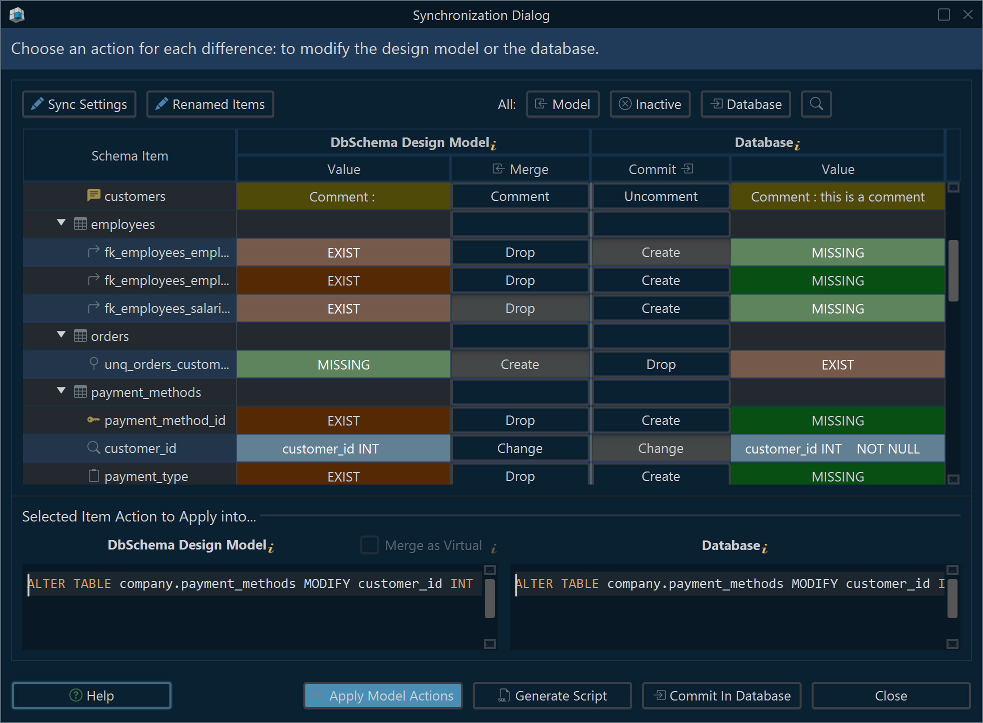
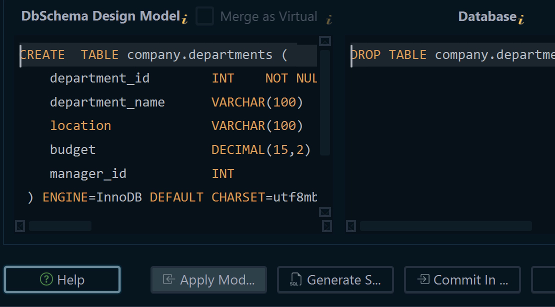
Both products synchronize schemas, and they point in different directions. DbSchema compares its local design model against a live database, or against a second model file. Open Schema → Compare Model with Database to read every difference in one tree, decide per object which side wins, then let Schema → Synchronize Model with Database generate the migration SQL. You edit that script before anything executes, which is what makes a dev, test and production promotion reviewable. Schema synchronization is Pro.
Navicat Premium 17.3.11 Enterprise provides structure synchronization between two live databases, and it also synchronizes a model workspace to a database and a database to a model workspace[2]. Structure synchronization is absent from the schedulable list; data synchronization and data transfer are on it.
Ask the same security questions of either product before you point it at production, because anything that compares environments holds credentials for all of them.
Database and NoSQL support
DbSchema connects to 70+ SQL and NoSQL databases over JDBC and downloads the driver for you: PostgreSQL, MySQL, SQL Server, Oracle, MariaDB and SQLite, plus MongoDB, Cassandra, Redis, Elasticsearch and DynamoDB. The same diagram, documentation and synchronization tools work on every one of them, so a team that owns a relational store and a document store buys one seat rather than two.
Navicat Premium 17.3.11 supports 16 database engines[2]: MySQL, PostgreSQL, SQL Server, Oracle, SQLite, MariaDB, MongoDB, Redis, Snowflake, OceanBase, GaussDB, TiDB, Fujitsu Enterprise Postgres, Dameng, KingbaseES and IvorySQL. Its cloud connections cover AWS, Azure, Google Cloud, Oracle Cloud, MongoDB Atlas, Redis Enterprise Cloud, Alibaba, Tencent and Huawei.
Relational coverage is close on both sides. The NoSQL lists are where the distance opens: Navicat's is MongoDB and Redis, and DbSchema adds Cassandra, Elasticsearch and DynamoDB to that pair.
Documentation generation
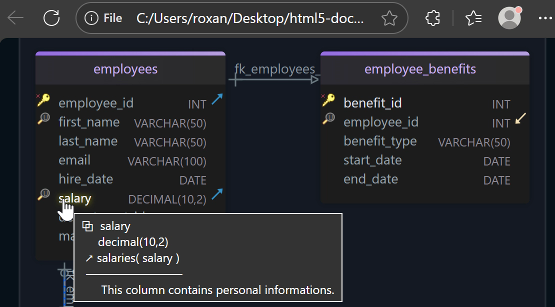
DbSchema generates documentation from the model, in three formats, from one dialog. Diagram → Export HTML5 or PDF Documentation writes an interactive HTML5 page that opens in any browser with no server behind it, carrying the diagram as a vector image, a searchable table list, full column details, and table and column descriptions as mouse-over tooltips. The same dialog writes PDF for a formal review and Markdown for a repository or a wiki. You choose which diagrams go in and how far the detail runs, down to indexes and comments. Documentation export is Pro.
Navicat Premium 17.3.11 Enterprise produces schema documentation too, which older comparisons deny. Its data dictionary is a built-in export[2], it prints database diagrams to PDF and to graphic files, and data dictionary generation can be scheduled. The format that Navicat does not produce is a browsable HTML5 package.
Pick on format. Interactive HTML5 suits onboarding and stakeholder review, where somebody clicks through the schema instead of reading it front to back. When the documentation has to regenerate itself for an audit trail, a DbSchema Groovy script exports it from the command line, so your CI pipeline can rebuild it on every schema change.
Data management and automation
DbSchema covers the design side and the data work that supports it. Pro adds the Relational Data Editor, which opens parent and child tables side by side over the foreign keys and refilters every child pane as you move through the parent, the Query Builder, which follows those same foreign keys to write the joins for you, the Data Generator and the Data Importer. Repeated work is scripted: Tools → Automation Scripts runs Java Groovy against the connected database and the project object, and those scripts also run from the command line, which is how a documentation or export job reaches a build.
Navicat Premium 17.3.11 Enterprise transfers data between engines, synchronizes data, backs up and restores, generates test data and builds data dictionaries. Backup, data transfer, data synchronization, data generation and data dictionary generation each run on a schedule, and profiles from several servers run in one batch job[2] with email notification.
Navicat Premium Enterprise covers more ground DbSchema does not attempt: an AI assistant wired into the query editor, BI dashboards with more than 20 chart types, and a PL/SQL and PL/pgSQL debugger[2]. That is the seat of the person who owns the servers. If editing relational data day to day is the work rather than designing schemas, there are Navicat alternatives built for editing relational data, and the DbSchema, Navicat and dbForge comparison adds a third product to this pair. The seat this page is about is the one that owns the schema, and DbSchema is built for it.
Pricing and licensing
DbSchema sells a perpetual licence with the first year of maintenance included. Pro is one payment, with an optional yearly renewal afterwards if you want the newer versions; Architect, which adds logical and conceptual design, sits one step above it on the same terms. Renewal buys new releases and support, so the version you own keeps working either way. Community Edition is free for any use, and the download carries a 15-day Architect trial you can extend by another 15 days. The purchase page carries the figure for each edition, in your local currency and on separate tabs for Business, Personal and Universities & Students, so read the tab that applies before you budget.
Navicat sells Navicat Premium as a perpetual licence through its own store, which shows the figure only after you pick platform, edition and quantity, so no Navicat price is quoted here. The store does publish its volume steps: 15% off at five to nine licences and 20% off at ten or more[4]. The trial runs 14 days, fully functional[5].
Compare the free editions on what they do, not on price, because both are free. Navicat Premium Lite covers connections, the grid view and the query editor, with up to five accounts per organization[3]. DbSchema Community Edition covers every supported database, reverse engineering, interactive diagrams and the SQL editor, so you can open your own schema as a diagram before you decide anything.
Which one fits the work you are buying for
Buy DbSchema when the schema is the deliverable: you draw tables before they exist, you keep the design in a file the team reviews in Git, you hand stakeholders documentation they can click through, and you want the change script to come out of a comparison rather than out of your head. That is one product across every engine you own, relational and document alike, and the diagram is where the work happens rather than where it is reported.
Download DbSchema at https://dbschema.com/download.html, connect it to a database you already run, and let it reverse-engineer the schema into a diagram. Connecting, reverse engineering, the interactive diagrams and the SQL editor are in the free Community Edition. The offline model file, schema synchronization, HTML5 documentation, the Query Builder, the Relational Data Editor and the Data Generator are Pro, and logical and conceptual design is Architect. Automation Scripts drive those same Pro jobs from Groovy, so the edition you need follows the job you script.
FAQ
Can DbSchema connect to the same databases as Navicat?
DbSchema connects to 70+ SQL and NoSQL databases over JDBC, and Navicat Premium 17.3.11 supports 16 engines[2] plus their cloud variants. The relational overlap is close to complete. On the NoSQL side the shared ground is MongoDB and Redis, and DbSchema adds Cassandra, Elasticsearch and DynamoDB.
How does offline design in DbSchema differ from Navicat model workspaces?
DbSchema keeps the whole design in one model file that you edit with no connection open and deploy when it is agreed, so the file is the artefact the team versions and reviews. Navicat Premium 17.3.11 Enterprise designs offline inside model workspaces[2], and Navicat Premium Lite has no model workspaces at all.
Which tool is better for Git-based team collaboration?
DbSchema, because the design is a single file and the Git dialog stages, commits, pushes and pulls it from inside the application. The Navicat Premium feature matrix lists no version control; Navicat Collaboration synchronizes connections, queries and workspaces through Navicat Cloud, which is shared state rather than branching and merging.
Is DbSchema cheaper than Navicat?
DbSchema Pro is a one-time purchase with the first year of maintenance included, and the purchase page shows what it costs in your own currency, on separate tabs for Business, Personal and Universities & Students. Navicat's store quotes Navicat Premium only after you choose platform, edition and quantity[4], so put the two side by side there for the licence count you actually need.
Can I use both tools together?
The two products sit on different seats. Navicat runs the day-to-day administration and the scheduled jobs, and DbSchema owns the schema design, the documentation and the Git history of the model file. The model file and the live database stay in step through DbSchema schema synchronization.
Sources
See your own schema as a diagram
DbSchema reverse-engineers your database into interactive ER diagrams in the free Community Edition. Pro adds the portable model file, schema synchronization and HTML5 documentation, on a 15-day trial.